



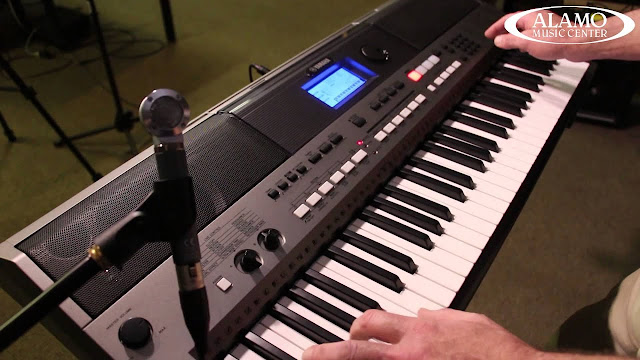
If you are a user Arranger Workstation keyboard, of course you’re already familiar with the so-called Style. This style is certainly one that makes you simple to accompany a song. But sometimes the style presets that exist on the keyboard has a lack of fit with the song being played. For example in Africa there is Rhumba, seben and congolese music, while the keyboard factory does not provide such styles. Fortunately, on some keyboards already provide facilities for its users to create their own style, like the keyboard Yamaha PSR-S900 that provides facilities a Style Creator. However, although making a Style was done directly on the keyboard, eventually the process of making styles become very complicated and time consuming is not small.
Download Seben, Lingala, Seben and modern praise and worship styles- Piano beats

Finally, the user must thought to look for software that can make these Style, with the aim to make the style more easily, quickly and freely. But this official software is rare and mostly expensive. or buy an artificial Style others who not infrequently made carelessly. For musicians who have advanced or expert level, of course this is very disturbing their musicality.
The steps that you should follow:
Download the official software here
- Open the application, and then make 16-channel MIDI.
- In the first bar (at the time 1:01:000), give two markers with the name SFF1 and then Sint.
- Then in the second bar and further, give each of the two markers at the same time with the name as in step 2:
– Main A and fn:Main A (for later played on the Main A)
– Main B and fn:Main B (for later played on the Main B)
– Main C and fn:Main C (for later played on the Main C)
– Main D and fn:Main D (for later played on the Main D)
– Fill In AA and fn:Fill In AA (for later played on the Fill In AA)
– Fill In BB and fn:Fill In BB (for later played on the Fill In BB)
– Fill In CC and fn:Fill In CC (for later played on the Fill In CC)
– Fill In DD and fn:Fill In DD (for later played on the Fill In DD)
– Intro A and fn:Intro A (for later played on the Intro A)
– Intro B and fn:Intro B (for later played on the Intro B)
– Intro C and fn:Intro C (for later played on the Intro C)
– Ending A and fn:Ending A (for later played on the Ending A)
– Ending B and fn:Ending B (for later played on the Ending B)
– Ending C and fn:Ending C (for later played on the Ending C)

If the display marker in software seen overlapping and unreadable, it’s normal. Bar distances between the markers can be customized to your needs.
Now you can fill each channels with the composition of music that will make your Style. Do not forget to specify the bank and instrument patch for each bank and patch patterns with instruments that suit to the song. Basic tones are used in the filling composition style that is “C” and should be major (not minor). Channel did not need to fill all, adjust your style needs. Place the drum instrument on channel 10
Download Worship piano sty files
Download Worship piano sty files
When it is done, then Save As: Standard MIDI Files 0 (do not Save into Standard MIDI Files 1). Because the result is a MIDI file, then that can be recognized by the Yamaha PSR-Series as a Style, then the next step that you should do is change the file extension (from *.mid to *.sty). The steps are:
- The first thing you should do is show up the file extension in Windows Explorer. The default settings of Windows usually did not bring his file extension (skip this step if you have Windows Explorer display the file extension). Bringing up the extensions are disable or enable the option “Hide extensions for Known file types” in Windows Explorer. The trick is:
- Open Windows Explorer.
- Select Tools, then Folder Options, and select the View tab.
- Remove the checklist sign on the “Hide extensions for Known file types“
- Clik OK.
- The next step is to change the file extension that will make these Style. For example the name of the file is Keroncong, then your files in Windows Explorer is displayed: “Keroncong.mid“.
- Change the file by replacing “Keroncong.mid” to “Keroncong.STY” or “Keroncong.S725.prs“. (Especially for PSR-S900, I recommend you to change the extension to *. S725.prs).
- If this came out the following warning: “If you change a file name extension, the file may become unusable. Are you sure you want to change it?”, Select Yes.
- Copy the file “Keroncong.sty” into a flash-disk/diskette. Put the flash-disk on your keyboard, copy style, then load into your keyboard in the User Style.
Congratulations, now you can make your own artificial styles for Yamaha PSR-Series which of course appropriate to your liking.






Download link please
We will update soon.please leave your email and subscribe -follow by email to get updates plus free samples and offers. Thanks
Lit 254
How To Create Keyboard Piano Beats Styles-Sty Files. Yamaha Psr Style Creator Software. – Jarzem Blogspot >>>>> Download Now
>>>>> Download Full
How To Create Keyboard Piano Beats Styles-Sty Files. Yamaha Psr Style Creator Software. – Jarzem Blogspot >>>>> Download LINK
>>>>> Download Now
How To Create Keyboard Piano Beats Styles-Sty Files. Yamaha Psr Style Creator Software. – Jarzem Blogspot >>>>> Download Full
>>>>> Download LINK cS