This step by step guide on how to add a table of content in Blogger. Before adding this to your blog you should know some benefits of having a table of content (TOC) in Blogger blog post.
Also Read-: How To add cookie consent in blogger
SEO Benefits of Table Of Content (TOC)
Google always loves well detailed and well-structured blog posts and pages. And by adding a table of content in Blogger blog posts, you make your blog post well structured and user-friendly. add a table of content in blogger to get a better result.
And if you add a TOC in your blog post, it will be structured and reader-friendly. Google may display jump to links in the Search Result Page, it’s very beneficial for webmasters and it can increase your CTR.
Improves User Experience
According to research by NN Group, more than 79% of total web readers are scanners who only read the important points of a webpage. We also love to read well-detailed articles.
User experience is a very important thing to get higher ranking in SERP (Search Result Page). User experience is a very important part of a blog to rank faster. And a table of content will help you to improve the user experience of your blog.
Adding a TOC in Blogger will allow the readers to jump to the important parts of a blog post. It will be easy for a reader to understand the content.
Also Read: How To add reading progress bar in bloggspot
1. Log into your Blogger
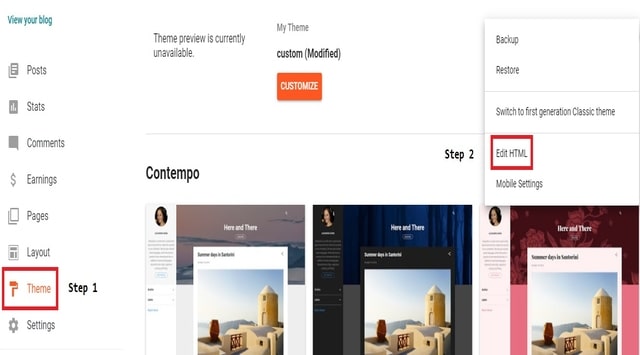
2.Select “Template or Theme” and click on “Three Dots” then Click on “EDIT HTML“.
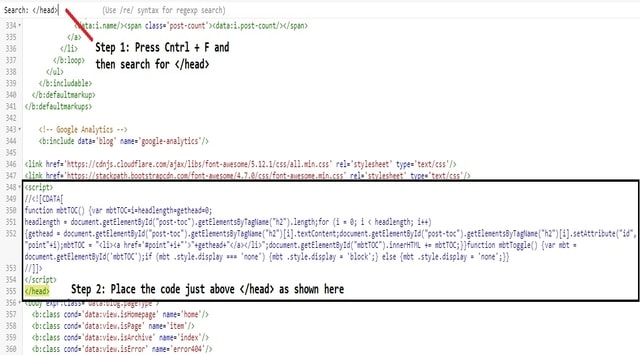
3. Now search for the </head> and paste the below script just above the </head> tag.
<script type='text/javascript'>
//<![CDATA[
//*************TOC plugin
function mbtTOC() {var mbtTOC=i=headlength=gethead=0;
headlength = document.getElementById("post-toc").getElementsByTagName("h2").length;for (i = 0; i < headlength; i++)
{gethead = document.getElementById("post-toc").getElementsByTagName("h2")[i].textContent;document.getElementById("post-toc").getElementsByTagName("h2")[i].setAttribute("id", "point"+i);mbtTOC = "<li><a href='#point"+i+"'>"+gethead+"</a></li>";document.getElementById("mbtTOC").innerHTML += mbtTOC;}}function mbtToggle() {var mbt = document.getElementById('mbtTOC');if (mbt .style.display === 'none') {mbt .style.display = 'block';} else {mbt .style.display = 'none';}}
//]]>
</script>
4. Now search ]]></b:skin> and paste the following CSS code just above ]]></b:skin> line.
.mbtTOC{border:5px solid #f7f0b8;box-shadow:1px 1px 0 #EDE396;background-color:#FFFFE0;color:#707037;line-height:1.4em;margin:30px auto;padding:20px 30px 20px 10px;font-family:oswald,arial;display:block;width:70%}.mbtTOC ol,.mbtTOC ul{margin:0;padding:0}.mbtTOC ul{list-style:none}.mbtTOC ol li,.mbtTOC ul li{padding:15px 0 0;margin:0 0 0 30px;font-size:15px}.mbtTOC a{color:#0080ff;text-decoration:none}.mbtTOC a:hover{text-decoration:underline}.mbtTOC button{background:#FFFFE0;font-family:oswald,arial;font-size:20px;position:relative;outline:none;cursor:pointer;border:none;color:#707037;padding:0 0 0 15px}.mbtTOC button:after{content:"f0dc";font-family:FontAwesome;position:relative;left:10px;font-size:20px}5. Lastly search for the <data:post.body/> , there can be more than 1 <data:post.body/> tag , Replace all of them with below code.
<div id="post-toc"><data:post.body/></div>
6. The coding part ends here, Click on “SAVE” and you are all done!
How to show TOC in blog post?
<div class="mbtTOC">
    <button onclick="mbtToggle()">Contents</button>
    <ol id="mbtTOC"></ol>
    </div>
Activating TOC in blog post
To active the TOC plugin paste the below Javascript code after the end of your post.
<script>mbtTOC();</script>If you want to change the colour of any elements, then you can easily change it in simple steps. Find the default style and colour of these all code and you can change as per your choice. You can Change Font, Font Colour and Font Style.
- Change background color #FFFFEO
- Change font
- Change border color #f7f0b8
- Change font color #707037
- Change Anchor link color #0080FF
- Change the font size of anchor Links 15px
- Change the font size of TOC heading text 20px
- Know HTML code of colour here https://htmlcolorcodes.com/