inkenya
  • Home
  • Marketing
    MarketingShow More
    How to Make Money Online in Kenya (2026 Guide for Beginners & Students)
    4 Min Read
  • Resouce
    ResouceShow More
    How to Get Free Website Hosting in Kenya (No Payment Required)
    2 Min Read
  • Features
    FeaturesShow More
  • Guide
    GuideShow More
  • Contact
  • Blog
Reading: How to add Scrolling News Headline in Blogger header
Share
Subscribe Now
inkenyainkenya
Font ResizerAa
  • Marketing
  • Resouce
  • Features
  • Guide
  • Complaint
  • Advertise
Search
  • Categories
    • Marketing
    • Resouce
    • Features
    • Guide
    • Lifestyle
    • Wellness
    • Healthy
    • Nutrition
  • More Foxiz
    • Blog Index
    • Complaint
    • Sitemap
    • Advertise
Follow US
Copyright © 2014-2023 Ruby Theme Ltd. All Rights Reserved.
Uncategorized

How to add Scrolling News Headline in Blogger header

Jarz
By Jarz
Last updated: April 18, 2026
12 Min Read
SHARE


Contents
What is a Headlines News Widget For Blogger?Is Headlines News Ticker Standards-Compliant?Features of Headlines News WidgetHow To add Headlines News Widget In Blogger?Facing Problems Installing Headlines News Widget?

headlines news widget for blogger with tooltipsHeadlines News Widget is an awesome, super lightweight plugin for Blogger blogs, which shows headlines of your recent posts as a scrolling text, floating from left to right. It’s a horizontal auto scrolling recent posts widget for blogger that is responsive and automatic. It’s built using Blogger JSON Feeds API and jQuery News Ticker plugin.

Scrolling headline news widget surely makes your introductory texts standout and noticeable as soon as a visitor lands on your blog. It’s the best way to draw visitors attraction towards your featured content.

    What is a Headlines News Widget For Blogger?

    Headlines News widget is basically a news ticker plugin which shows latest headlines of your blogspot blog as a horizontal scrolling text. It’s the first news ticker of its kind for blogger blogs that does not only display your title links like ordinary tickers found across the web but also shows post info such as:

    • Author Name
    • Author Avatar
    • Comments Link
    • Comments Count
    • Published Date
    • Featured Thumbnail
    • Post description/summary snippet

    [Desktop View]
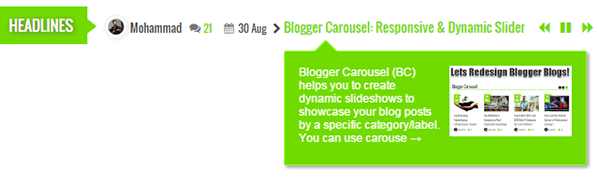
    headlines news widget for blogspot with tooltips

    You can choose to display recent posts by label by specifying a particular category or you can simply choose to show latest posts. It can easily be customized to change its background colors and fonts. Headline news widget is mobile responsive and fits perfectly to different screen sizes.

    [Mobile View]

    news headlines widget - mobile responsive

    We have already released its simplest version but today we will add some more features to it like CSS3 tooltips to display description and featured image. To add a simple news gadget for blogger without tooltips then please check the following tutorial:

    • Breaking News Ticker

    If in case you want a simple news widget to display text, custom html or even RSS/Atom feed then try our jQuery Announcement widget, where you can display headline news in vertical scroll.

    Is Headlines News Ticker Standards-Compliant?

    Headlines News ticker widget uses CSS and jQuery to create the scrolling text animation. It does not uses the <marquee> tag. We are using standards-compliant jQuery script and CSS3 to make the text scroll across the screen. The text animation is controlled used navigation such as play/pause and Next/Previous buttons, which makes it really easy for website visitors to navigate between scrolling headlines. 

    headlines news ticker widget for blogger

    The marquee tag is a non-standard HTML element which causes text to scroll up, down, left or right automatically. This feature is obsolete now and its use is discouraged by W3C.

    Important – It is highly recommended to backup your existing template before customizing or making changes to your template as if something goes wrong, you can restore your original template.

    Features of Headlines News Widget

    Headlines News Ticker is an advanced widget equipped with these features:

    • Author Avatar
    • Displays latest posts dynamically
    • Displays recent posts from a specific category/label
    • Tooltips support
    • Shows Post Description/Summary
    • Shows Featured Thumbnail Image
    • Scrolling text with two animations: reveal & fade
    • Clickable Comments Count
    • Custom Date Format
    • Title Length is adjustable
    • Fully Customizable – Multi Colors!
    • Responsive and mobile friendly
    • Controls Navigation. Play/Pause, Next/Previous
    • Support all browsers: Firefox, Chrome, IE, Safari etc.
    Headlines News Widget Specs
    Created Dec 10, 2016
    Last Update Jan 23, 2017
    Compatible Browsers IE9, IE10, IE11, Firefox, Safari, Opera, Chrome, Edge
    Technology Used JSON, CSS3, HTML4, jQuery, JavaScript
    Layout Mobile Responsive
    Platform Support Google Blogger 1.0
    Text Direction LTR

    How To add Headlines News Widget In Blogger?

    Follow these easy steps:

    1. Go To Blogger > Template
    2. Backup your template
    3. Click “Edit HTML“
    4. Just below <head> tag paste the following JS and CSS source links:
             

      <link href='http://fortawesome.github.io/Font-Awesome/assets/font-awesome/css/font-awesome.css' rel='stylesheet'/>
      <link href='http://fonts.googleapis.com/css?family=Oswald' rel='stylesheet' type='text/css'/>

    5. Next search ]]></b:skin> and just above it paste the following code:
             

      /*--------------Headlines News Widget By MyBloggerTricks.com----------*/

      .ticker-wrapper.has-js{margin:20px 0;padding:0 20px;width:780px;height:32px;display:block;-webkit-border-radius:15px;-moz-border-radius:15px;border-radius:15px;background-color:#f8f0db;font-size:.75em}
      .ticker{width:710px;height:23px;display:block;position:relative;overflow:hidden;background-color:#f8f0db}
      .ticker-title{padding-top:9px;color:#900;font-weight:700;background-color:#f8f0db;text-transform:uppercase}
      .ticker-content{margin:0;padding-top:9px;position:absolute;color:#1F527B;font-weight:700;background-color:#f8f0db;overflow:hidden;white-space:nowrap;line-height:1.2em}
      .ticker-content a{text-decoration:none;color:#1F527B}
      .ticker-content a:hover{text-decoration:underline;color:#0D3059}
      .ticker-swipe{padding-top:9px;position:absolute;top:0;background-color:#f8f0db;display:block;width:800px;height:23px}
      .ticker-swipe span{margin-left:1px;background-color:#f8f0db;border-bottom:1px solid #1F527B;height:12px;width:7px;display:block}
      .ticker-controls{padding:8px 0 0;list-style-type:none;float:left}
      .ticker-controls li{padding:0;margin-left:5px;float:left;cursor:pointer;height:16px;width:16px;display:block}
      .ticker-controls li.jnt-play-pause{background-image:url(../images/controls.png);background-position:32px 16px}
      .ticker-controls li.jnt-play-pause.over{background-position:32px 32px}
      .ticker-controls li.jnt-play-pause.down{background-position:32px 0}
      .ticker-controls li.jnt-play-pause.paused{background-image:url(../images/controls.png);background-position:48px 16px}
      .ticker-controls li.jnt-play-pause.paused.over{background-position:48px 32px}
      .ticker-controls li.jnt-play-pause.paused.down{background-position:48px 0}
      .ticker-controls li.jnt-prev{background-image:url(../images/controls.png);background-position:0 16px}
      .ticker-controls li.jnt-prev.over{background-position:0 32px}
      .ticker-controls li.jnt-prev.down{background-position:0 0}
      .ticker-controls li.jnt-next{background-image:url(../images/controls.png);background-position:16px 16px}
      .ticker-controls li.jnt-next.over{background-position:16px 32px}
      .ticker-controls li.jnt-next.down{background-position:16px 0}
      .js-hidden{display:none}
      .no-js-news{padding:10px 0 0 45px;color:#F8F0DB}
      .left .ticker-controls,.left .ticker-content,.left .ticker-title,.left .ticker{float:left}
      .left .ticker-controls{padding-left:6px}
      .right .ticker-controls,.right .ticker-content,.right .ticker-title,.right .ticker{float:right}
      .right .ticker-controls{padding-right:6px}
      /*########Default Style by MBT#########*/
      .ticker-wrapper.has-js{margin:0 0 -200px;padding:0;width:98%;min-height:242px;display:block;border-radius:0;background-color:#fff;border:0 solid #eee;font-size:12px;overflow:hidden}
      .ticker{width:80%;height:42px;display:block;position:relative;overflow:visible;background-color:#fff}
      .ticker-title{background:#71db00;padding:9px 10px;color:#FFF;font-size:16px;font-family:oswald;text-transform:uppercase;text-shadow:1px 1px 6px #666}
      .ticker-title:after{left:90px;top:10px;height:0;width:0;position:absolute;content:" ";pointer-events:none;margin-left:0;margin-top:1px;border-left:13px solid #71db00;border-top:10px solid transparent;border-bottom:10px solid transparent;-moz-transform:scale(.9999)}
      .ticker-content{background-color:#fff;margin-left:18px!important;color:#444;margin-top:1px!important;overflow:visible!important; padding-top: 2px!important;}
      .ticker-swipe{background-color:#fff;position:relative;top:6px;left:110px!important}
      .ticker-swipe span{margin-left:1px;background-color:#fff;border-bottom:1px solid #333;height:12px;width:7px}
      .ticker-controls{padding: 0px!important;margin: 17px 0 0 10px!important;list-style-type:none;position:relative;right:-50px}
      .ticker-controls li{padding:0;margin-left:5px;float:left;cursor:pointer;height:16px;width:16px;display:block}
      .ticker-controls li a{border:0px!important; padding:0px!important;}
      .ticker-controls li.jnt-play-pause,.ticker-controls li.jnt-play-pause.paused,.ticker-controls li.jnt-play-pause.paused.over,.ticker-controls li.jnt-prev,.ticker-controls li.jnt-play-pause.over,.ticker-controls li.jnt-next{position:absolute;background:none}
      .ticker-controls li.jnt-play-pause:after,.ticker-controls li.jnt-play-pause.over:after{content:"f04c";font-size:13px;color:#71db00;font-family:fontAwesome;position:relative;left:1.8em}
      .ticker-controls li.jnt-play-pause.paused:after,.ticker-controls li.jnt-play-pause.paused.over:after{content:"f04b";font-size:13px;color:#71db00;font-family:fontAwesome;position:relative;left:1.8em}
      .ticker-controls li.jnt-prev:after{content:"f04a";font-size:13px;color:#71db00;font-family:fontAwesome;position:relative;left:0}
      .ticker-controls li.jnt-next:after{content:"f04e";font-size:13px;color:#71db00;font-family:fontAwesome;position:relative;left:3.6em}
      .ticker .iauthor:before, .ticker .icomments:before, .ticker .idate:before{font-family:fontAwesome;position:relative;padding-right:8px;color:#fff}
      .ticker .iauthorpic{width:17px!important;height:17px!important;border-radius:50%;float:none;display:inline-block!important;margin-right:3px;position:relative;
      top: 6px;border: 1px solid #eeeeee;
          -moz-box-shadow: 1px 1px 5px rgba(0, 0, 0, .1);
          -webkit-box-shadow: 1px 1px 5px rgba(0, 0, 0, .1);
          box-shadow: 1px 1px 5px rgba(0, 0, 0, .1);
          padding: 3px;
      }
      .ticker span {padding-right:5px; font-family:Oswald; font-weight:normal}
      .ticker .icomments a{color:#71db00;font-size:11px}
      .ticker .icomments a:hover{text-decoration:underline}
      .ticker .icomments:before{content:'f086';padding:0 3px 0 0px;color:#777;position:relative; top:-1px}
      .ticker .idate{font-size:11px;padding-right:7px;}
      .ticker .idate:before{content:'f073';padding:0 5px;color:#777; position:relative; top:-1px}
      .ticker .mbttitle{font-family:oswald;font-size:14px;color:#71db00!important;font-weight:400;text-decoration:none;}
      .ticker .mbttitle:hover{text-decoration:underline}

      /*------ CSS3 Tooltip by MBT -------------*/
      .ticker .tooltip{outline:none;text-decoration:none!important;position:relative}
      .ticker .tooltip strong{line-height:30px}
      .ticker .tooltip > span{width:290px; white-space: normal; padding:15px 15px 0px 15px;opacity:0;top:170%;visibility:hidden;z-index:10;position:absolute;font-family:Arial;font-size:12px;font-style:normal;border-radius:2px;box-shadow:2px 2px 5px #999;-webkit-transition-property:opacity,margin-top,visibility,margin-left;-webkit-transition-duration:0.4s,0.3s,0.4s,.3s;-webkit-transition-timing-function:ease-in-out,ease-in-out,ease-in-out,ease-in-out;transition-property:opacity,margin-top,visibility,margin-left;transition-duration:0.4s,0.3s,0.4s,.3s;transition-timing-function:ease-in-out,ease-in-out,ease-in-out,ease-in-out}
      .ticker .tooltip > span img{float:right;width:130px;margin:0 0 30px 10px;padding: 0;border: none;}
      .ticker .tooltip:hover > span{opacity:1;text-decoration:none;visibility:visible;overflow:visible;display:inline;margin-left:0px}
      .ticker .tooltip span b{width:15px;height:15px;margin-left:20px;bottom:-9px;display:block;position:absolute;-webkit-transform:rotate(-45deg);-moz-transform:rotate(-45deg);-o-transform:rotate(-45deg);transform:rotate(-45deg);display:none /;*display:none}
      .ticker .tooltip > span{color:#fff; background:#71db00;border:1px solid #94fb26}
      .ticker .tooltip span b{margin-top:-19px;top:10px;background:#71db00;border-top:1px solid #94fb26;border-right:1px solid #94fb26;border-bottom:1px solid #71db00;border-left:1px solid #71db00}

      @media only screen and (max-width:480px) {
      .ticker-content {margin-left: -5px!important;padding-top: 4px!important;}.ticker-title{font-size:10px!important;padding:5px!important;}
      .ticker-controls, .ticker .icomments, .ticker .idate, .ticker .iauthor, .ticker .iauthorpic, .ticker-title:after {display:none;}}

      Make these custom changes

      • To change the green color theme of the News Ticker simply replace the green highlighted color codes with color of your choice. Use our  Color Code Generator.
      • Read also: How to add a download timer countdown in blogger
    6. Save your template.
    7. Now go to Blogger > Layout
    8. Select “Add a Gadget“
    9. Choose “HTML/JavaScript” gadget
    10. Keep the title field empty and then paste the following code inside it:
             

      <!-- ######### Headlines News Widget By MBT ############# -->

      <script type="text/javascript" src="http://ajax.googleapis.com/ajax/libs/jquery/1.6.0/jquery.min.js"></script>
      <script src="http://www.jquerynewsticker.com/includes/jquery.ticker.js" type="text/javascript"></script>

      <!-- ######### Writing Callback Function ############# -->
      <script type="text/javascript">
      //----------------------------Defaults
      var ListBlogLink = "http://www.mybloggertricks.com";
      var ListCount = 5;
      var TitleCount = 70;
      var ListLabel ="Widgets";
      var ChrCount = 140;
      var ImageSize = 200;

      //----------------------------Function Start
      function mbtlist(json) {
      document.write('<ul id="js-news" class="js-hidden">');
      for (var i = 0; i < ListCount; i++)
      {

      //-----------------------------Variables Declared
      var listing= ListImage = ListUrl = ListTitle = ListImage = ListContent = ListConten = ListAuthor = ListTag = ListDate = ListUpdate = ListComments = thumbUrl = TotalPosts = sk = AuthorPic= ListMonth = Y = D = M = m = YY = DD = MM = mm = TT =  "";
      //----------------------------- Title URL
      for (var j = 0; j < json.feed.entry[i].link.length; j++) {
      if (json.feed.entry[i].link[j].rel == 'alternate') {
      break;
      }
      }
      ListUrl= "'" + json.feed.entry[i].link[j].href + "'";
      //----------------------------------- Title Stirng
      if (json.feed.entry[i].title!= null)
      {
      ListTitle= json.feed.entry[i].title.$t.substr(0, TitleCount);
      }

      if (json.feed.entry[i].thr$total)
      {
      ListComments= "<a href='"+json.feed.entry[i].link[j].href+"#comment-form'>"+json.feed.entry[i].thr$total.$t+"</a>";
      }
      ListAuthor= json.feed.entry[i].author[0].name.$t.split(" ");
      ListAuthor=ListAuthor.slice(0, 1).join(" ");
      AuthorPic = json.feed.entry[i].author[0].gd$image.src;


      //################### Content Check
      ListConten = json.feed.entry[i].content.$t;
      ListContent= ListConten.replace(/(<([^>]+)>)/ig,"").substring(0, ChrCount);

      //################### Date Format

      ListMonth= ["Jan", "Feb", "Mar", "Apr", "May", "Jun", "Jul", "Aug", "Sep", "Oct", "Nov", "Dec"];

      ListDate= json.feed.entry[i].published.$t.substring(0,10);

                               Y = ListDate.substring(0, 4);
                              m = ListDate.substring(5, 7);
                               D = ListDate.substring(8, 10);
                               M = ListMonth[parseInt(m - 1)]; 

      //################### Thumbnail Check
      if (json.feed.entry[i].media$thumbnail)
      {
      thumbUrl = json.feed.entry[i].media$thumbnail.url;
      sk= thumbUrl.replace("/s72-c/","/s"+ImageSize+"/");
      ListImage= "'" + sk.replace("?imgmax=800","") + "'";
      }

      // YouTube scan
      else if (json.feed.entry[i].content.$t.match(/youtube.com.*(?v=|/embed/)(.{11})/) != null)
      {
          var youtube_id = json.feed.entry[i].content.$t.match(/youtube.com.*(?v=|/embed/)(.{11})/).pop();
         
          if (youtube_id.length == 11) {
              var ListImage = "'//img.youtube.com/vi/"+youtube_id+"/0.jpg'";
              }
      }


      else if (json.feed.entry[i].content.$t.match(/src=(.+?[.jpg|.gif|.png]")/) != null)
      {
      // Support For 3rd Party Images
      ListImage =  json.feed.entry[i].content.$t.match(/src=(.+?[.jpg|.gif|.png]")/)[1];
      }
      else
      {
      ListImage= "'https://blogger.googleusercontent.com/img/b/R29vZ2xl/AVvXsEj_vsPjsXJxYUERP6FfE19dxrX4D-g4cNRCkFsJxbpmMGu_n4GZOITHKIl-3nzY1jie00dt-V6IM2XdV1po0kt501JqWkHKlDAECuQ2EDQt4qlOm4AQmDd_3B9LAJVyW0VHXZrJmgRr74M/s200/Icon.png'";
      }

      //----------------------------------- Printing List
      var listing = "<li class='news-item'><span class='iauthor'><img class='iauthorpic' src='"+AuthorPic+"'/>"
      +ListAuthor+ "</span> <span class='icomments'>"
      +ListComments + "</span>  <span class='idate'>"
      + D + " " + M + "</span><i class='fa fa-chevron-right'></i> <a class='mbttitle tooltip' href="
      +ListUrl+
      "><span><b></b><img src="
      +ListImage+
      "/>"
      +ListContent+
      " →</span>"+ListTitle+"</a></li>";
      document.write(listing);
      }}

      document.write("</ul><script src='"+ListBlogLink+"/feeds/posts/default/-/"+ListLabel+"?alt=json-in-script&callback=mbtlist'></"+"script>");
      /*##########Newsticker settings########*/
          $(function () {
              $('#js-news').ticker({
              speed: 0.20,
              controls: true,  
              titleText: 'Headlines',
              displayType: 'reveal',
              pauseOnItems: 2000});
      });
      </script>

      Make these changes:

      • ListBlogLink : Insert your Blog URL here
      • ListCount : Decide how many headlines do you wish to display.
      • TitleCount : Choose how many characters to display in post title length.
      • ListLabel : Insert your blog label here. Remember that labels are case sensitive. Therefore type it exactly as it is shown in your browser address bar. News Ticker will not work if label case is not correct. 
      • ChrCount : Set the length of post description here.
      • ImageSize : Set image resolution (aspect ratio) here.
      • speed: Edit this value (0.20) to increase or decrease the scroll speed.
      • controls: Set true to false if you wish to hide the control buttons i.e. Play/Pause, Next/Previous
      • titleText: Set the News Ticker title here from Headlines to anything you like such as Latest, Hottest etc.
      • displayType: There are two types of scrolling text animation, reveal or fade. Set it as per your preference.
      • If you want to show latest posts headlines of your blog without mentioning any specific label/category then simply remove /-/”+ListLabel+” from the code above.
    11. Click Save button and you are all done.

    Enjoy showing animated plus scrolling news headlines to your visitors! 🙂

    Facing Problems Installing Headlines News Widget?

    I tried keeping these steps as simple as possible but if in case you are facing problems in any step please feel free to post your queries below. I would love to help as soon as time allows.

    Important: Hope you enjoyed our article on How to add Scrolling News Headline in Blogger header. Please if this worked for give us a five star rating or bookmark this website. Read more blogger tricks here for free

    TAGGED:Blogger Tricks

    Sign Up For Daily Newsletter

    Be keep up! Get the latest breaking news delivered straight to your inbox.
    [mc4wp_form]
    By signing up, you agree to our Terms of Use and acknowledge the data practices in our Privacy Policy. You may unsubscribe at any time.
    Share This Article
    Facebook Copy Link Print
    Previous Article How to add a beautiful chrismas countdown in blogspot.
    Next Article Seben keyboard styles – Free seben beats download
    Leave a Comment

    Leave a Reply Cancel reply

    Your email address will not be published. Required fields are marked *

    FacebookLike
    XFollow
    PinterestPin
    InstagramFollow

    Subscribe Now

    Subscribe to our newsletter to get our newest articles instantly!
    [mc4wp_form]
    Most Popular
    How to Get Free Website Hosting in Kenya (No Payment Required)
    April 16, 2026
    How to Make Money Online in Kenya (2026 Guide for Beginners & Students)
    April 16, 2026
    How to unlock dtv channels on smart tv
    April 18, 2026
    How to unlock locked channels on smart TV
    April 18, 2026
    Yamaha psr-e443 styles free download
    April 18, 2026

    You Might Also Like

    Uncategorized

    How to add reading progress in Blogger

    3 Min Read
    Uncategorized

    (WORKING) How to create unlimited emails without verification code 2022

    8 Min Read
    Uncategorized

    How to Bypass SMS Verification or OTP 100% working in 2022

    5 Min Read
    Uncategorized

    How to hack a Facebook Page And Accounts with these 20 Possible Ways!

    26 Min Read

    Always Stay Up to Date

    Subscribe to our newsletter to get our newest articles instantly!
    [mc4wp_form]
    inkenya

    We provide tips, tricks, and advice for improving websites and doing better search.

    Latest News

    • SEO Audit Tool
    • Client ReferralsNew
    • Execution of SEO
    • Reporting Tool

    Resouce

    • Google Search Console
    • Google Keyword Planner
    • Google OptimiseHot
    • SEO Spider

    Get the Top 10 in Search!

    Looking for a trustworthy service to optimize the company website?
    Request a Quote
    Welcome Back!

    Sign in to your account

    Username or Email Address
    Password

    Lost your password?